Wednesday, January 20, 2010

Subversion authentication problem in Hudson

I tried to move a TeamCity .NET project to Hudson.
Build script is written in NAnt so I only needed to change the TeamCity environment properties to the Hudson equivalents.

But I run into the same authentication problem as with TeamCity described in earlier post:

ERROR: Failed to update https://<removed>/svn/MyProject/trunk org.tmatesoft.svn.core.SVNCancelException: svn: authentication cancelled

Hudson uses the SvnKit as well so I was pretty sure what the cause was, the Java NTLM implementation.

After adding the property -Dsvnkit.http.ntlm=jna to the Hudson configuration file, hudson.xml, and restarting the Hudson Windows service, everything worked perfectly!

Wednesday, October 21, 2009

Using secure Subversion from TeamCity

I have installed TeamCity (5.0 EAP version) on a Windows 2003 server. Both the Tomcat web server and the build agent are started as windows services.

The Subversion server is installed on a Linux server with Apache Tomcat web server. The Subversion server is protected with HTTPS.

When I tried to connect to the SVN-server through TeamCity, I always received the authentication error:

svn: Authentication required for '<https://<server name>:443>'

And the strange thing is that it worked fine if I used the SvnKit command tool, with the same user. So it was no certificate problem.

Searching the Internet for solutions always ended up with suggestions to change the svnkit.http.methods parameter.
But it had no effect on My problem. I was sure that NTLM authentication should be used, and from version 4.0.2 of TeamCity, the NTLM protocol is used by default.

Finally, I found out that SvnKit includes two NTLM implementations, the default is pure Java. But its also possible to use the native NTLM through the JNA library.

I added the svnkit.http.ntlm=jna parameter and suddenly the SVN connection was successful!!!
So much pain for this small window :-)

image 

JNA is included in the TeamCity Windows build agent package, so its not even necessary to install it on the server.

The SvnKit parameter must be defined in two places, for the build agent and for the web server:

1. The build agent properties file, i.e. <install path>TeamCity\buildAgent\launcher\conf\wrapper.conf:

# TeamCity agent JVM parameters
wrapper.app.parameter.2=-ea
wrapper.app.parameter.3=-Xmx512m
# The next line can be removed (and the rest of the lines renumbered) to prevent memory dumps on OutOfMemoryErrors
wrapper.app.parameter.4=-XX:+HeapDumpOnOutOfMemoryError
# Preventing process exiting on user log off
wrapper.app.parameter.5=-Xrs
# Uncomment the next line (insert the number instead of "N" and renumber the rest of the lines) to improve JVM performance
# wrapper.app.parameter.N=-server
wrapper.app.parameter.6=-Dlog4j.configuration=file:../conf/teamcity-agent-log4j.xml
wrapper.app.parameter.7=-Dsvnkit.http.ntlm=jna
wrapper.app.parameter.8=-Dteamcity_logs=../logs/
wrapper.app.parameter.9=jetbrains.buildServer.agent.AgentMain
# TeamCity agent parameters
wrapper.app.parameter.10=-file
wrapper.app.parameter.11=../conf/buildAgent.properties

2. Configure the Tomcat web server.

Open the configuration window with <install path>TeamCity\bin\tomcat6w.exe //ES//TeamCity.

Add the SvnKit parameter in the Java tab – Java Options:
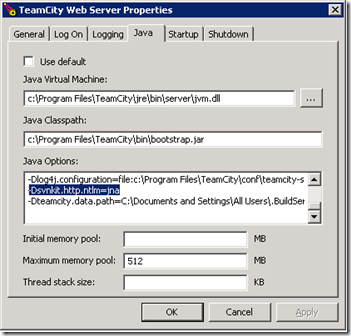
image

Restart both services to get the new parameter initiated.

Thursday, September 10, 2009

Executing PartCover from NAnt

I wanted to replace NCover with PartCover. PartCover is a new code coverage tool, and its still a freeware.

With NCover I had to run NUnit twice, first to get the unit test results, and then another run to get the code coverage. (At least with the last freeware version of NCover, 1.5.8. I have not tried the commercial versions)

With PartCover its possible to run the tests AND get the coverage at the same time.

Another advantage is that I can use newer versions of NUnit. The NCover 1.5.8 does not work with NUnit from version 2.5.

It seemed rather easy, but I had problems with quotes in the NAnt build file. The PartCover always terminated with an exception, whatever I tried; quotes, variables, expressions:

Invalid option '--target=C:\Program Files\NUnit 2.4.5\bin\nunit-console.exe'

One work-around is to use a NUnit or PartCover configuration file, but I wanted the NAnt build file to be independent.

The solution was to use HTML character entity references, i.e. a double quote (“) can be written as &quot;.

Example of NAnt target that executes PartCover which in turn produces both a coverage report and a unit test report in a specified folder:

  <target name="unitTest">

    <!-- Get all unit test assemblies -->
    <foreach item="File" property="filename">
      <in>
        <items basedir=".">
          <include name="${Build.Output}\bin\${MyProject}.Test.dll"></include>
          <include name="${Build.Output}\bin\${MyProject}.*.Test.dll"></include>
        </items>
      </in>
      <do>

        <echo message="Unittesting ${filename}"/>

        <exec program="${PartCoverHome}\Partcover.exe" failonerror="true">
          <arg line="--target &quot;${NUnitExePath}&quot;" />
          <arg line="--target-work-dir ${Build.Output}\bin"/>
          <arg line="--target-args &quot;${filename} /xml=${Build.Reports}\${path::get-file-name-without-extension(filename)}-UnitTest.xml&quot;" />
          <arg line="--include [${MyProject}.*]*" />
          <arg line="--exclude [${MyProject}.*Test*]*" />
          <arg line="--output ${Build.Reports}\${path::get-file-name-without-extension(filename)}-Coverage.xml" />
        </exec>
      </do>
    </foreach>
  </target>